

Hollyland Lark M2 Wireless Microphone Review: Is It Worth Buying?
Clear sound is essential for recording high-quality videos, conducting interviews, creating podcasts, and producing engaging social media content. However, using a built-in smartphone microphone can be challenging when recording outdoors or speaking from a distance. The Hollyland Lark M2 Wireless Microphone is designed to help content creators capture clearer voice recordings without dealing with long microphone cables.
This compact wireless microphone system features small magnetic transmitters, a mobile receiver, noise cancellation, and a portable charging case. The Lightning model works with supported Apple devices that feature a Lightning connector, making it convenient for recording audio on compatible iPhones and other devices.
In this Hollyland Lark M2 Wireless Microphone review, we will explore its main features, battery performance, wireless range, compatibility, advantages, and potential limitations to help you decide whether it suits your recording needs.
What Is the Hollyland Lark M2 Wireless Microphone?
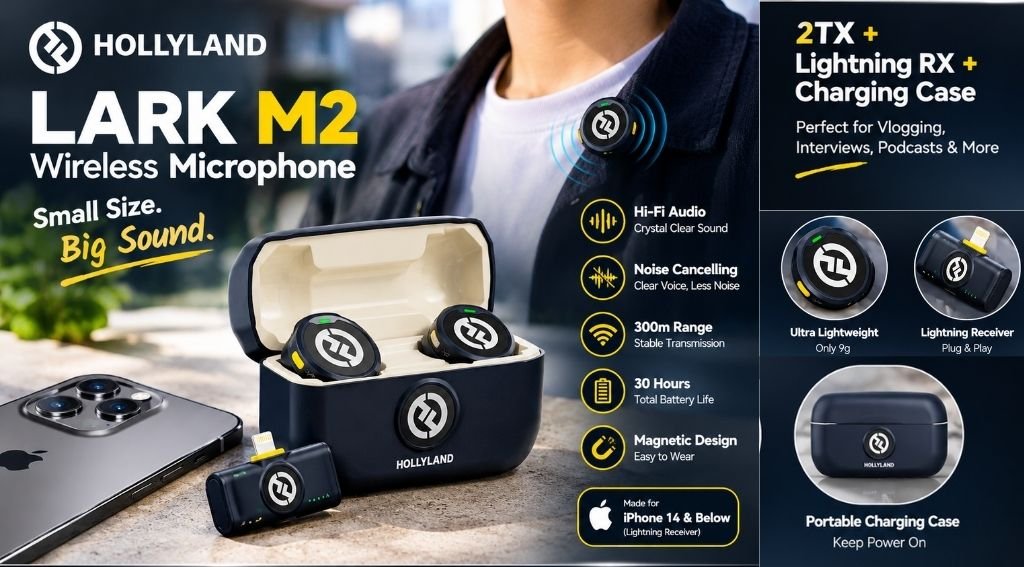
The Hollyland Lark M2 is a small, lightweight wireless microphone designed to help content creators, vloggers, podcasters, and interviewers capture clear, high-quality audio for videos and other recordings. Instead of connecting a traditional wired microphone directly to your phone, you can attach a small transmitter to your clothing and connect the receiver to your compatible device.
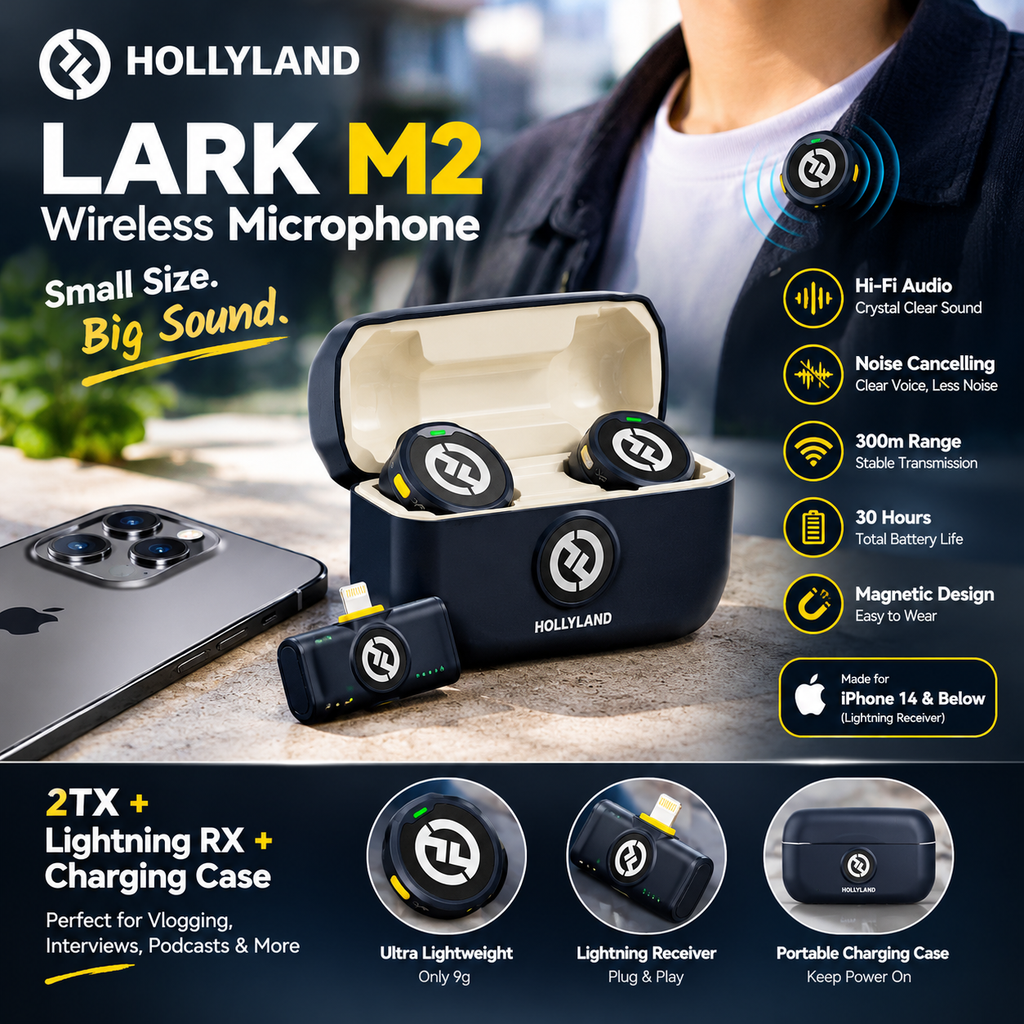
The product configuration discussed in this review includes two transmitters, a Lightning receiver, and a charging case. This setup can be useful when recording conversations between two people or capturing interviews.
Its lightweight design also makes it convenient to carry in a bag or pocket when traveling or recording content away from home.
Key Features of the Hollyland Lark M2 Wireless Microphone
Here are the main features worth considering before purchasing this microphone system.
1. Compact and Lightweight Design.
The Hollyland Lark M2 transmitter weighs approximately 9 grams. Its small, button-style design helps keep it discreet when attached to clothing.
The magnetic attachment system makes it convenient to position the microphone on a shirt or similar garment. This design can be particularly useful for creators who want to record videos without holding a microphone in their hands.
However, placement matters. Thick clothing, fabric rubbing against the microphone, and poor positioning can affect the recorded sound.
2. High-Quality Audio Recording
The Hollyland Lark M2 supports 48 kHz/24-bit audio recording specifications. It uses an omnidirectional microphone pattern to capture sound from different directions around the transmitter.
This can help when recording speech for YouTube videos, interviews, tutorials, and podcasts.
The final sound quality can vary based on your surroundings, microphone position, device compatibility, and audio recording settings. For the best results, place the transmitter near the speaker’s mouth and record a short test before filming an important video.
3. Environmental Noise Cancellation.
Background noise can make speech difficult to understand, especially when recording outside or in a busy environment.
The Hollyland Lark M2 includes environmental noise cancellation that can help reduce unwanted background sounds. This feature may be useful for vloggers, mobile journalists, and people recording videos in public spaces.
Noise cancellation does not remove every sound. Loud traffic, wind, crowds, and other environmental noise may still be audible. Test the microphone in your intended recording environment to determine whether the results meet your expectations.
4. Wireless Transmission Range.
The manufacturer lists a wireless transmission range of up to 300 meters (approximately 1,000 feet) under line-of-sight conditions for the mobile version.
This long advertised range may be useful for certain outdoor recording situations. However, the maximum range is measured under specific conditions and should not be treated as a guarantee of stable audio in every environment.
Buildings, walls, other wireless devices, and physical obstructions can reduce the usable distance. For interviews and ordinary vlogging, keeping the transmitter and receiver reasonably close is generally a practical approach.
5. Battery Life and Charging Case.
Battery life is another important consideration when choosing a wireless microphone.
The Hollyland Lark M2 transmitter is rated for approximately 10 hours of operation under the manufacturer’s specified conditions. The mobile charging case can recharge two transmitters simultaneously more than twice, according to the product specifications.
The listing for the configuration discussed here advertises up to 30 hours of use. Actual total usage time depends on the package, charging cycles, recording conditions, and how the system is used.
The charging case helps keep the components charged between recording sessions. Before buying, check the seller’s exact battery-life claim and confirm which accessories are included.
6. Two Transmitters for Interviews.
The included two-transmitter setup can be helpful when recording two people at the same time.
For example, one transmitter can be attached to a presenter while the other is worn by a guest. This can make interviews, product demonstrations, and two-person videos easier to record.
Before an important recording, check that both transmitters are connected and that both voices are being captured correctly by your recording app.
iPhone Compatibility: Is the Lightning Version Right for You?
Compatibility is one of the most important things to check when buying the Hollyland Lark M2 Wireless Microphone.
The package described in this review includes a Lightning receiver intended for compatible Apple devices with a Lightning connector.
Before ordering, consider these points:
- I Phone 14 and older models: Check that your particular iPhone has a compatible Lightning port.
- I Phone 15 and newer models: These models use USB-C, so you should generally choose the USB-C version instead of the Lightning version.
- Other devices: Confirm connector compatibility and operating-system requirements before purchasing.
- Included accessories: Check that the product listing matches the receiver and charging case shown in the images.
Choosing the correct receiver can help prevent compatibility problems after delivery.
Pros and Cons of the Hollyland Lark M2 Wireless Microphone
Pros
- Compact transmitter weighing approximately 9 grams.
- Wireless design without a long microphone cable.
- Environmental noise cancellation.
- Advertised transmission range of up to 300 meters under line-of-sight conditions.
- Two transmitters for interviews and two-person recordings.
- Charging case for portable storage and recharging.
- Supports 48 kHz/24-bit audio recording specifications.
Cons
- The Lightning version is not the right direct-connection choice for USB-C-only iPhones.
- Wireless performance can decrease when obstacles or interference are present.
- Noise cancellation cannot eliminate every background sound.
- Buyers must verify the exact package and accessories before ordering.
- A compact microphone may still require careful positioning to avoid clothing noise.
Who Should Buy the Hollyland Lark M2?
The Hollyland Lark M2 Wireless Microphone may be worth considering if you regularly record spoken audio and want a compact wireless setup.
It may suit:
YouTube creators recording tutorials or product reviews.- Vloggers who need a lightweight microphone.- Podcasters conducting interviews.- Social media creators making short videos.- People recording two-person conversations.- Mobile content creators who prefer a portable microphone system.
However, it may not be the best choice for everyone. If you mainly record in a quiet room, a less expensive wired microphone could be sufficient. If you need to connect to a newer USB-C iPhone, choose a compatible version.
What to Check Before Buying
Before purchasing the Hollyland Lark M2 Wireless Microphone, verify the following details:
1. Receiver type: Confirm that the package includes the Lightning receiver if your device requires it.
2. Transmitter quantity: Check that two transmitters are included in the selected package.
3. Charging case: Verify the included case and its charging capabilities.
4. Battery specifications: Compare the seller’s advertised usage time with the manufacturer’s specifications.
5. Seller and warranty: Review seller information, return conditions, and warranty coverage.
6. Current price: Compare the total price, shipping fees, and available offers before ordering.
These checks can help you choose the correct configuration for your needs.
Frequently Asked Questions.
1. Is the Hollyland Lark M2 Wireless Microphone good for YouTube?
It can be a useful option for YouTube creators who record talking-head videos, interviews, tutorials, and outdoor content. Its suitability depends on your recording environment, device compatibility, and audio requirements.
2. How long does the Hollyland Lark M2 battery last?
The transmitter is rated for approximately 10 hours of operation under specified conditions. The charging case can provide additional charging cycles, although total usage time depends on the configuration and how the system is used.
3. Does the Hollyland Lark M2 have noise cancellation?
Yes. The system includes environmental noise cancellation to help reduce unwanted background sounds. Results vary depending on the type and intensity of surrounding noise.
4. Can I use the Lightning version with an iPhone 15?
The iPhone 15 uses USB-C rather than Lightning. You should generally select the USB-C version of the microphone system and verify compatibility with your particular device.
5. Is the Hollyland Lark M2 suitable for interviews?
Yes, the two-transmitter configuration can be useful for interviews and conversations involving two speakers. Always test the connection and recording levels before starting.
Is the Hollyland Lark M2 Wireless Microphone Worth Buying?
How Good Is the Hollyland Lark M2 Wireless Microphone for Video Recording?
What Are the Best Features of the Hollyland Lark M2 Wireless Microphone?
Is the Hollyland Lark M2 Wireless Microphone Compatible with iPhones?
How Long Does the Hollyland Lark M2 Wireless Microphone Battery Last?


Leave a Reply