

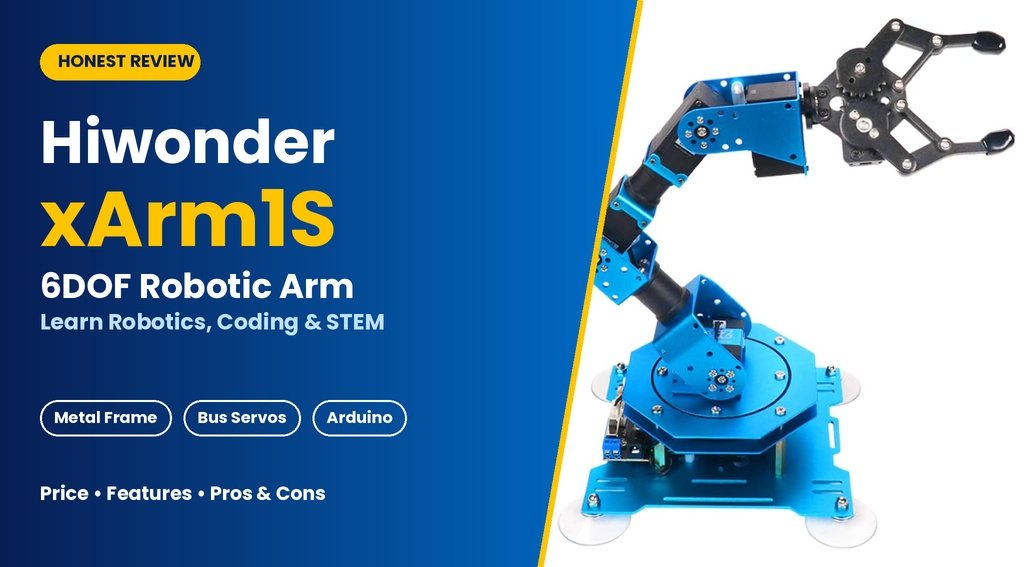
Hiwonder xArm1s Review: Is This Desktop Robotic Arm Worth Buying?
Robotics used to mean expensive lab equipment and a university budget. Today, a desktop robotic arm lets students, hobbyists, and teachers learn how real robots move, grip, and follow instructions, all from a table at home.
The Hiwonder xArm1S is one of the more popular options in this category. It is a 6-axis (6DOF) kit with a full-metal frame, intelligent bus servos, and several ways to control it, including a wireless gamepad, a mouse, PC software, and a phone app.
This guide covers what the xArm1S offers, how it works, where it shines, where it falls short, and who should consider buying it.
What Is the Hiwonder xArm1S?
The xArm1S is a build-it-yourself robotic arm designed for education and hobby robotics. “6DOF” means six degrees of freedom: six independently controlled joints, including the gripper. That gives it a wide range of motion, so it can rotate, lift, bend, reach, and grasp.
Because it is a kit, you assemble it yourself. Assembly is part of the value, since you learn how each joint connects and how the structure supports its movement. A pre-assembled version is also sold at a higher price for anyone who wants to skip the building stage.
What Comes in the Box?
Based on the product images, the kit includes:
- Anodized aluminum alloy brackets and base plates
- Six servos and the gripper assembly
- Servo controller board
- Bearing ring and four suction cups
- Wireless gamepad with USB receiver
- USB cable and power adapter
- Screws, nuts, standoffs, and servo cables
- A screwdriver
Check the listing for the exact contents before ordering, since packaging can change between sellers and production batches.
Key Features at a Glance
Full-Metal Aluminum Alloy Structure
Many entry-level kits use plastic or acrylic parts that flex or crack under stress. The xArm1S uses anodized blue aluminum brackets, which feel rigid and look professional. The metal also holds up better to repeated assembly, adjustment, and classroom use.
Six Intelligent Bus Servos
Servos are the heart of any robot arm. The xArm1S uses serial bus servos instead of the basic hobby servos found in cheaper kits. According to the product listing, they report feedback on position, voltage, and temperature. In practice, that means:
- You can read current joint positions instead of guessing.
- Temperature monitoring helps protect the servos from overheating.
- Daisy-chained wiring keeps the cabling cleaner.
The product images show LX-225 servos rated at 25 kg·cm for the heavier joints, LX-15D servos for others, and an anti-blocking digital servo for the gripper.
Anti-Blocking Gripper
The black metal gripper uses a gear-driven pincer design. The anti-blocking function protects the servo if the gripper is stopped by an object, reducing the chance of burning out the motor when it squeezes something solid. The listing says it can pick up objects weighing up to 500 g, which covers blocks, small toys, and lightweight parts.
Bearing Base and Suction Cups
The rotating base has a bearing so the arm turns smoothly, and four vacuum suction cups hold it to a flat surface. Stability matters for precision. A robotic arm that slides around while it moves is frustrating to use, and the suction cups help prevent that.
Dedicated Bus Servo Controller
The controller board manages the servos and handles communication with the control devices. It supports wireless connection through the included gamepad receiver, and it connects to a PC by USB.
Multiple Ways to Control the Robotic Arm
This is one of the xArm1S’s strongest selling points. You can pick the control method that suits your skill level.
| Control Method | Best For |
|---|---|
| Wireless PS2-style gamepad | Beginners and kids who want instant, hands-on play |
| Mouse control | Smooth, intuitive on-screen control |
| PC software | Building and saving action sequences |
| Phone app | Quick control without a computer |
| Arduino programming | Advanced coding and custom projects |
Gamepad Control
Gamepad control is the easiest way to start. You can move the arm and open or close the gripper within minutes of finishing assembly. Moving a toy block from one spot to another is a surprisingly satisfying first success.
PC Software Control
This is where the learning gets deeper. The Hiwonder software shows a table of actions, with a time value and servo positions for each step. You can move the arm into a pose, record it as an action, and string several actions into a sequence. You can then run it online, loop it, save it as a file, or download it to the controller. This teaches the idea of keyframes: you define key poses and the system handles the movement between them.
Arduino Programming
Arduino compatibility is useful for people who want to go beyond the included software. Writing your own code means you can add sensors, buttons, or other modules and build projects of your own.
Programming and Learning Value
A robotic arm is more than a toy once you start thinking about how it moves. The xArm1S can teach several valuable concepts:
- Kinematics basics: how joint angles combine to place the gripper somewhere in space.
- Sequencing and logic: planning the order of actions for a pick-and-place task.
- Timing and motion control: adjusting duration values for smooth versus fast movement.
- Feedback systems: reading servo data and responding to it.
- Graphical to text-based coding: starting with software-based editing, then moving toward Arduino code.
For a school or home STEM program, this progression is useful. A student can begin with a gamepad, advance to recording action groups, and eventually write real code.
Pros and Cons
Pros
- Sturdy full-metal construction with a premium look
- Intelligent servos with position, voltage, and temperature feedback
- Five control methods for different skill levels
- Good learning path from beginner play to Arduino coding
- Action-editing software for recording and replaying motion sequences
- Stable base with a bearing and suction cups
- Pre-assembled option available
Cons
- Assembly takes time and patience, especially for first-time builders
- The 500 g load limit is fine for a desktop arm, but not for heavy lifting
- Precision is good for education but not at industrial level
- Software and instructions take some learning, and Windows PC use is the most convenient route
- Import and shipping costs can add a lot to the price in some countries
Who Should Buy the Hiwonder xArm1S?
Students and Beginners
If you want a first real robotic arm that teaches how robotics works, this is a good fit.
Parents and Teachers
It is a hands-on STEM tool that combines mechanical building, electronics, and coding in one project. Younger children will likely need adult help with assembly.
Hobbyists and Makers
If you enjoy tinkering, the Arduino support lets you modify and expand the arm for personal projects.
Content Creators
The arm looks great on camera, and its pick-and-place demos are engaging for tutorials and videos.
Who Should Skip It
If you need to lift heavy loads, require high-precision industrial repeatability, or want a ready-to-use machine with no assembly and no learning curve, a different product will serve you better.
Tips for Getting the Most Out of the xArm1S
- Build on a clean, organized surface. Sort the small screws and nuts into containers before you start.
- Follow the assembly order carefully. Servo orientation and zero positions matter. Check each joint before tightening everything.
- Calibrate before your first run. Use the software’s servo reset and deviation adjustment tools.
- Start with the gamepad. Get comfortable with the movement range before programming.
- Keep the robotic arm on a smooth, flat surface so the suction cups grip properly.
- Don’t force the joints by hand while powered. Use the controls to avoid stressing the servos.
- Begin with simple tasks. Try stacking two blocks, then build up to multi-step sequences.
Project Ideas to Try
- Block stacking challenge: build a small tower using only the gamepad.
- Pick-and-place sorter: move colored blocks to different spots with a saved action sequence.
- Automated “bartender” demo: pick up and move a lightweight cup.
- Drawing or pointing demo: attach a lightweight marker or pointer to the gripper.
- Arduino sensor project: trigger an action when a button is pressed or a sensor detects something.
Price and Value
At the time of the listing, the standard kit was about $199.99, with a pre-assembled version around $239.99. Prices change often, so check the current figure before you buy.
For that price, you get a metal-framed, six-servo robotic arm with feedback-capable servos, software, and a controller, which is a solid package for the category. Cheaper robotic arm kits exist, but they often use plastic parts and basic servos with fewer learning possibilities. If you live outside the seller’s country, shipping and import charges can add a large amount, so work out the full landed cost before deciding.
Frequently Asked Questions
Is the Hiwonder xArm1S good for beginners?
Yes. Gamepad and mouse control make it easy to start, and the software and Arduino support let you grow into programming. Assembly requires patience, though.
How many degrees of freedom does it have?
It is listed as a 6DOF, 6-axis arm, including the gripper.
How much weight can this robotic arm lift?
The listing states it can grasp objects up to 500 g.
Can I control the robotic arm with my phone?
Yes, the listing says it supports a phone app along with PC, mouse, and wireless gamepad control.
Does it work with Arduino?
It is marketed for Arduino coding. Check Hiwonder’s documentation for the exact setup and compatible tools.
Is it suitable for kids?
With guidance, yes. Younger children will need help with assembly and software setup. It is best for older kids and teens, or for family projects.
Final Verdict
The Hiwonder xArm1S is a capable and well-rounded desktop robotic arm for anyone who wants to learn robotics through hands-on building and programming. The aluminum frame, intelligent bus servos, bearing base, and multiple control options give it more depth than a typical entry-level kit.
It is not an industrial machine, and it asks for patience during assembly and setup. But for students, teachers, and hobbyists, it offers solid value as a first step into real robotics. If you are ready to move beyond watching robot videos and start building, this robotic arm is worth a serious look.





Leave a Reply