

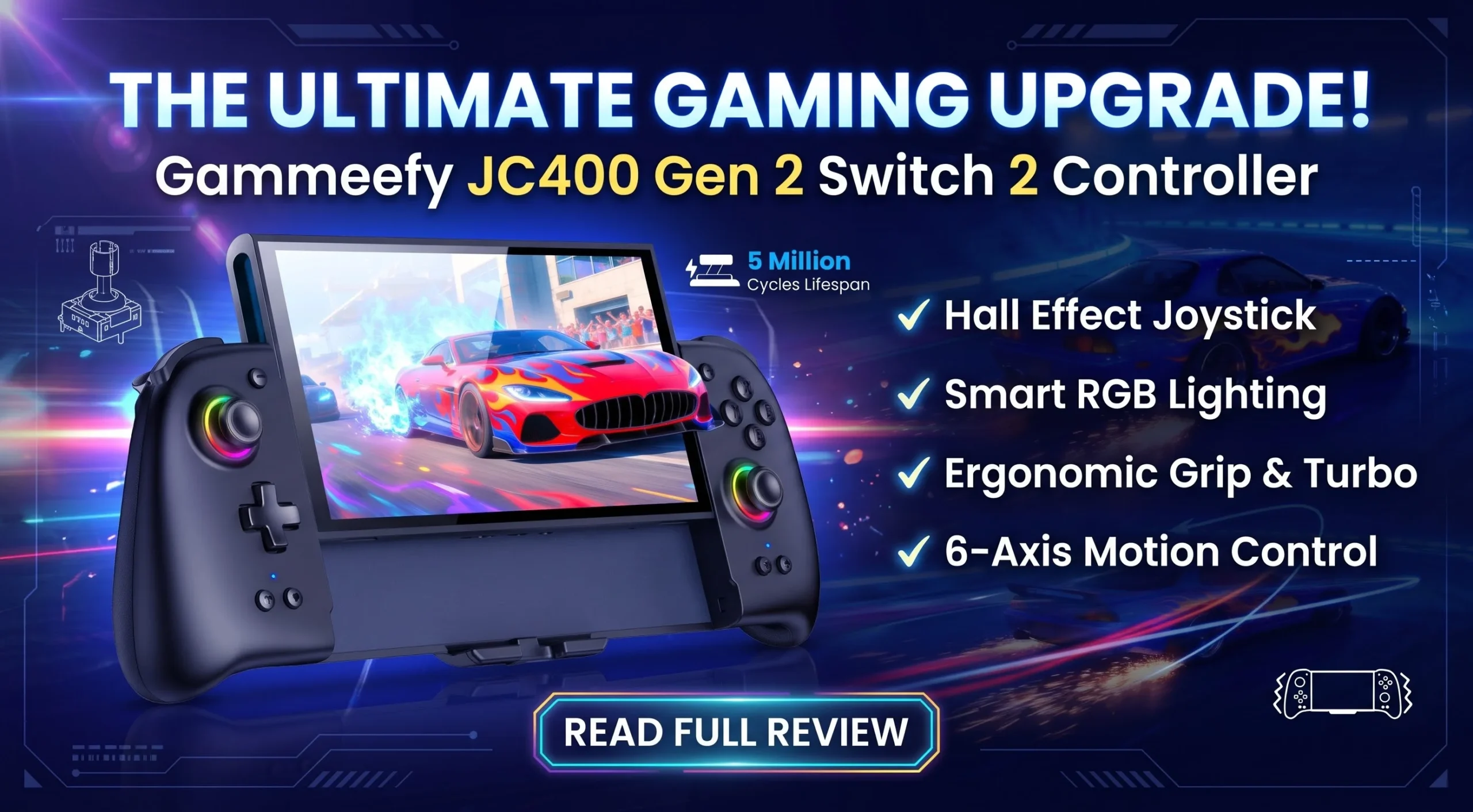
Gammeefy JC400 Gen 2 Review: A Comfortable, Drift-Free Switch 2 Controller.
Handheld gaming is great until your hands start to hurt. Anyone who has played a long session on the Switch 2 in handheld mode knows the feeling: cramped fingers, sore palms, and a grip that was never designed for marathon play. That is the problem the Gammeefy JC400 Gen 2 sets out to solve.
This Switch 2 Controller wraps around the console and turns it into a full-size handheld, with Hall Effect joysticks, RGB lighting, programmable buttons, and a built-in kickstand. In this guide, we walk through its features, who it suits, and what to check before you buy.
What Is the Gammeefy JC400 Gen 2?
The JC400 Gen 2 is a handheld Switch 2 Controller that replaces the Joy-Con grip arrangement while the console is in handheld mode. You attach the console in the middle, and the controller halves on each side give you a full-size, console-style grip.
It comes in two sizes, 6.2″/7″ and 7.9″, so check that you pick the one that matches your console. The Switch 2 uses the 7.9″ version. Several colors are available, including a matte black version and a few colorful designs.
One important note: this controller is made only for the Nintendo Switch 2. It is not compatible with the original Switch.
Ergonomic Full-Size Grip
Comfort is the headline feature. The JC400 uses a contoured, palm-friendly shape that aims to spread pressure across your palms, fingers, and wrists instead of concentrating it in a few spots. The textured grip surfaces help your hands stay put, and the button and trigger layout is designed so your thumbs and index fingers rest naturally on their controls.
Why does that matter? A cramped grip leads to fatigue, and fatigue leads to missed inputs and shorter sessions. A larger, rounded Switch 2 Controller like this one can make long play sessions of racing games, action titles, or RPGs more pleasant, especially for people with larger hands.
Hall Effect Joysticks: Built to Resist Drift
Stick drift is one of the most common complaints about modern controllers. It happens when the internal parts that detect stick movement wear down, so the game registers input you never made.
The JC400 uses Hall Effect joysticks, which work with magnets and electromagnetic induction instead of a physical carbon film. With no contact surface to wear away, the design is much more resistant to drift. The manufacturer lists the following figures:
- A lifespan of 5 million cycles, which the listing describes as about 2.5 times longer than standard carbon-film sticks
- Stable operation from −40°C to 85°C
If you have ever had to replace a controller because of drift, a Hall Effect Switch 2 Controller is one of the most sensible upgrades you can make.
Smart RGB Joystick Lighting
The JC400 adds a ring of light around each joystick. Here is what you can customize:
- 8 LED colors selectable directly on the controller
- 3 lighting modes
- 4 brightness levels
- 16.7 million colors through the free Keylinker app for deeper customization
There is a dedicated light button for quick adjustments, so you do not need the app for everyday changes. The lighting is described as vibrant but easy on the eyes. If you prefer a clean look, you can turn the brightness down. And since lighting uses power, switching it off or lowering it will help the battery last longer.
Battery Life and Play-While-Charging
The JC400 has a 1000mAh battery. The manufacturer says it can deliver up to around 10 hours of gameplay in light mode. Actual runtime will vary depending on lighting, vibration, and how you play.
A big addition in this generation is the bottom charging port. It lets you charge the setup while you keep playing, so a low battery does not have to end your session. That is a real convenience for long trips, couch sessions, or tournament-style gaming marathons.
Wake-Up Function
This feature is easy to misunderstand, so here is how it works. The JC400 supports a wake-up function, which lets you wake the console from sleep by pressing the Home button. However, activating it requires the original Switch 2 Joy-Con. The setup process looks like this:
- With the Joy-Con connected, open Settings > Controllers > Change Grip/Order on the console.
- Press and hold the Home button on the JC400 for about 3 seconds until controller icons appear on the screen.
- Remove the right Joy-Con for about 1 second, then reattach it.
- Insert the console into the JC400. From then on, a brief press of Home wakes it from sleep.
Keep your Joy-Con nearby for this one-time activation. Afterward, you get the convenience of waking the console without reaching for its power button.
Built-In Stand Mode
Many handheld grips force you to remove the controller if you want to play in tabletop mode. The JC400 does not. It has a built-in stand that folds out from the back, so you can switch to tabletop play without taking the Switch 2 Controller off.
This is handy for watching videos, playing multiplayer games with a friend beside you, or giving your hands a rest during a long session. It also saves you from carrying a separate stand.
Programmable Buttons, Macros, and Turbo
For players who like to customize, the JC400 has some of the most flexible options in its class.
Programmable ML and MR Buttons
The back buttons, ML and MR, can be programmed to copy other inputs. The listing says you can assign up to 21 button values, including the face buttons, shoulder buttons, triggers, D-pad, and stick clicks (L3 and R3). This is useful if you want to keep your thumbs on the sticks while still pressing other buttons.
Auto Cycle (Loop) Programming
An auto-cycle function can repeat a programmed sequence, which is handy for repetitive tasks such as grinding in certain games. According to the product images, you start it with a long press of about 3 seconds. You can also temporarily switch programming on or off with a double-click, which helps prevent accidental presses during a game that needs normal controls.
Clearing Programs
You can clear all programs with a long press on the M button for about 5 seconds, or clear a single program using the M button and the specific button you want to reset. Always check the included manual for the exact steps for your unit.
Turbo
The controller offers 3-level turbo, with rates of 5, 12, or 20 shots per second. Turbo means a held button keeps firing automatically, which can be useful for shooters or games with many dialog boxes. Because turbo can change how some games feel, and competitive online modes may have their own rules, use it responsibly and only where it is allowed.
Motion Controls and Vibration
The JC400 includes a 6-axis gyroscope, so motion-controlled games, including aiming and tilt-based steering, can work as intended. The manufacturer lists examples such as Zelda and Mario Kart 8 Deluxe.
It also offers 5 levels of adjustable vibration, from 0% to 100%. If rumble bothers you, or if you want to save battery, you can lower it. If you love feeling every impact, turn it up.
The triggers are described as high-precision for quick response, which matters in racing, shooters, and fighting games.
Better Protection for Your Console
Attaching a bulky grip can make people nervous about their expensive console. The JC400 aims to reassure in a few ways:
- A gap of less than 1mm between the console and controller for a snug fit
- A rugged shell that helps absorb impact from accidental drops
- A rear latch switch that locks the console in place
- A scratch-resistant padded contact surface
No accessory can make a console drop-proof, so treat these as helpful extras rather than guarantees.
Game Card Storage
Another practical upgrade is the built-in game card storage on the back, with slots for up to four cards. A mortise and tenon slot design is intended to prevent misinsertion and card jamming, so you can carry a few favorites without a separate case.
Who Should Buy the Gammeefy JC400 Gen 2?
This Switch 2 Controller is a strong fit if you:
- Play in handheld mode for long sessions and want more comfort
- Have had stick drift on previous controllers
- Like RGB lighting and customization
- Want macros, turbo, or extra programmable buttons
- Want a kickstand and game card storage built into the same accessory
- Want to play while charging
Who Might Want to Skip It?
It is not for everyone. Consider other options if you:
- Mostly play docked on a TV (a regular wireless controller may suit you better)
- Own the original Switch, since this is made for the Switch 2 only
- Prefer the slim, pocketable feel of a bare console
- Do not want to deal with the one-time wake-up setup, which needs the original Joy-Con
Tips Before You Buy
- Check the size. Choose the 7.9″ version for the Switch 2 and make sure it matches your console.
- Check shipping. Availability depends on your location, and some listings may not ship to every region.
- Read recent reviews. The product is rated around 4.4 stars from several hundred ratings at the time of writing, but always look at the latest feedback.
- Keep your Joy-Con handy for the wake-up activation.
- Check the return policy in case the fit or comfort does not suit your hands.
Frequently Asked Questions
Does this Switch 2 Controller work with the original Switch?
No. It is designed only for the Nintendo Switch 2.
Does it need a separate battery or charger?
It has a built-in 1000mAh battery and a bottom charging port, so you can charge it and play at the same time.
Will the RGB lights drain the battery?
Lighting uses some power. Lowering the brightness or switching it off can help the battery last longer.
Does it support motion controls?
Yes. It has a 6-axis gyroscope for compatible games.
Can I program the back buttons?
Yes. The ML and MR buttons can be programmed with up to 21 button values, with auto-cycle and temporary on/off options.
Is Hall Effect really drift-free?
Hall Effect sticks are far more resistant to the wear that causes drift, because they do not rely on a physical contact film. No stick lasts forever, but they are widely considered more durable.
Final Verdict
The Gammeefy JC400 Gen 2 is a feature-packed Switch 2 Controller aimed at players who want comfort, durability, and customization in one accessory. The full-size ergonomic grip, drift-resistant Hall Effect joysticks, play-while-charging port, built-in stand, game card storage, and programmable buttons give it a lot of practical value, and the RGB lighting adds some personality.
If you spend most of your time playing your Switch 2 in handheld mode, it is worth a serious look. Make sure you choose the correct size, keep your Joy-Con nearby for the wake-up setup, and confirm that it ships to your location before you order.
Frequently Asked Questions
1. What is the Gammeefy JC400 Gen 2, and is it worth buying?
The Gammeefy JC400 Gen 2 is an ergonomic handheld controller for Nintendo Switch 2. It offers Hall Effect joysticks, RGB lighting, programmable buttons, and a built-in stand, making it a useful option for handheld gaming.
2. Is the Gammeefy JC400 Gen 2 compatible with Nintendo Switch 2?
Yes, the Gammeefy JC400 Gen 2 is designed specifically for Nintendo Switch 2. It is not compatible with the original Nintendo Switch.
3. Does the Gammeefy JC400 Gen 2 have Hall Effect joysticks?
Yes, the Gammeefy JC400 Gen 2 features Hall Effect joysticks that use magnetic technology to reduce physical wear and help prevent stick drift.
4. How comfortable is the Gammeefy JC400 Gen 2 for long gaming sessions?
The Gammeefy JC400 Gen 2 features an ergonomic, full-size grip designed to provide better hand support and reduce discomfort during extended gaming sessions.
5. How long does the Gammeefy JC400 Gen 2 battery last?
The Gammeefy JC400 Gen 2 has a built-in 1000mAh battery that offers up to approximately 10 hours of gameplay in light mode. Actual battery life depends on usage and settings.
6. Does the Gammeefy JC400 Gen 2 support RGB lighting customization?
Yes, the Gammeefy JC400 Gen 2 supports RGB lighting customization with multiple colors, lighting modes, and brightness levels through its controls and the Keylinker app.
7. Can you use the Gammeefy JC400 Gen 2 while charging?
Yes, the Gammeefy JC400 Gen 2 supports play-while-charging through its bottom charging port, allowing you to continue gaming while charging the controller.
8. Does the Gammeefy JC400 Gen 2 support programmable buttons and turbo?
Yes, the Gammeefy JC400 Gen 2 includes programmable ML and MR back buttons, macro functions, and three-level turbo settings for customized gameplay.
9. Does the Gammeefy JC400 Gen 2 have a built-in kickstand?
Yes, the Gammeefy JC400 Gen 2 features a built-in foldable kickstand that allows tabletop gaming without removing the controller from the console.
10. What are the pros and cons of the Gammeefy JC400 Gen 2?
The Gammeefy JC400 Gen 2 offers an ergonomic grip, Hall Effect joysticks, RGB lighting, programmable buttons, and a built-in stand. However, it is designed only for Nintendo Switch 2 and may feel bulky to users who prefer a slim handheld setup.





Leave a Reply