

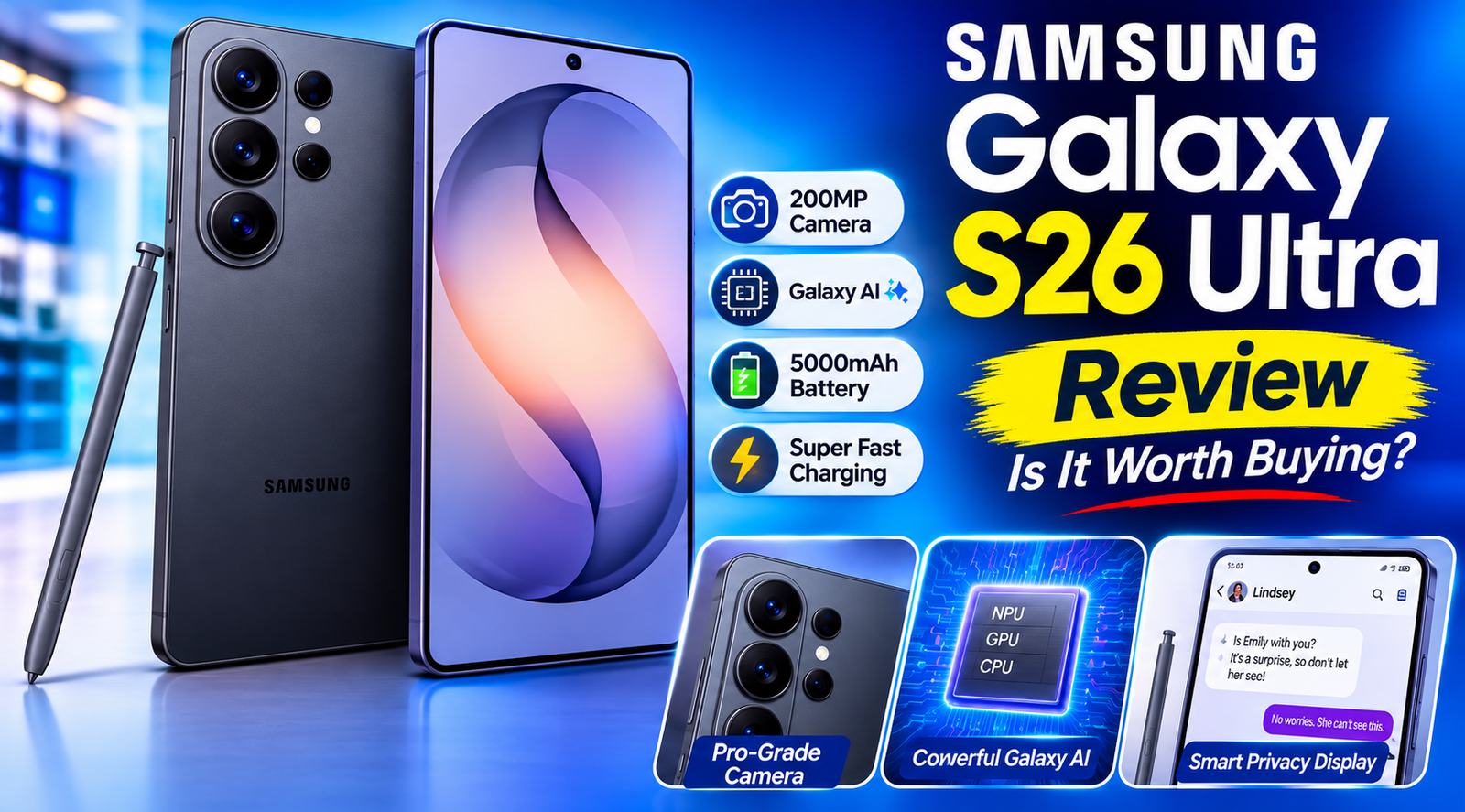
Samsung Galaxy S26 Ultra Review: Camera, Privacy Display, Battery and Galaxy AI Explained
Every year, flagship phones promise to change the way we shoot photos, work and protect our data. Most of the time the changes are small. The Samsung Galaxy S26 Ultra is more interesting than usual, because it pairs a very capable five-camera system with something we have not seen in a phone before: a Privacy Display built into the screen itself.
In this guide, we walk through what the Samsung Galaxy S26 Ultra offers, what is included in the box, which color to pick, and who will get the most from it. Everything below is based on Samsung’s published product highlights, so you can use it as a clear starting point before you buy.
Samsung Galaxy S26 Ultra at a Glance
Before the details, here is a quick summary of the headline features:
- Cameras: 200MP wide, 50MP ultra wide, 50MP 5x telephoto, 10MP 3x telephoto and a 12MP selfie camera
- Display: the world’s first Privacy Display built into a phone (must be enabled in settings)
- Battery: 5000mAh with up to 60W wired charging (charger sold separately)
- Processor: a customized processor for Galaxy with NPU, GPU and CPU, built to be fast and AI-ready
- Pen: a built-in S Pen for notes, sketches and precise control
- Colors: Black, White, Sky Blue and Cobalt Violet
- Software: Galaxy AI, with basic features provided by Samsung for free
Design and Color Options
The Samsung Galaxy S26 Ultra keeps the familiar Ultra look: a large, flat-feeling slab with a tidy vertical stack of camera lenses on the back and a clean front with a small punch-hole selfie camera. The finish is matte and soft, which helps it feel premium without becoming a fingerprint magnet.
Four Colors to Choose From
Samsung offers the Samsung Galaxy S26 Ultra in four colors:
- Black: understated and professional, a safe choice for work and travel.
- White: bright, crisp and modern, with a silver-toned frame.
- Sky Blue: a light, calm pastel that stands out from the usual dark flagships.
- Cobalt Violet: the boldest option, a deep purple that looks different in every light.
If you plan to use a case, pick the color you enjoy looking at most when the case is off. If you like to show off your phone, Cobalt Violet and Sky Blue are the most distinctive.
A Camera System Built for Every Distance
Photography is where the Samsung Galaxy S26 Ultra tries hardest to impress. Samsung calls it “our best camera with ProVisual Engine,” and the lineup of lenses backs up the claim on paper. Here is what each camera is for.
200MP Wide Camera (f/1.4)
This is your main camera. The very high resolution captures a lot of detail, and the bright f/1.4 aperture lets in plenty of light, which is especially useful at night and indoors. It also supports 2x optical-quality zoom, so you can frame a shot tighter without a noticeable drop in sharpness.
50MP Ultra Wide Camera (f/1.9)
Perfect for landscapes, architecture, big group photos and tight interiors. A 50MP sensor keeps edges and fine textures clearer than the lower-resolution ultra wide cameras of the past.
Two Telephoto Cameras for Real Zoom
The phone carries two separate telephoto lenses:
- 10MP, f/2.4 with 3x optical zoom: ideal for portraits and everyday subjects at a medium distance.
- 50MP, f/2.9 with 5x optical zoom and 10x optical-quality zoom: made for concerts, sports, wildlife and street photography when you cannot get close.
Having both 3x and 5x lenses means less reliance on digital cropping, which usually gives cleaner results across the zoom range.
12MP Selfie Camera (f/2.2)
The front camera is suited to video calls, vlogs and social posts. Its wide f/2.2 aperture helps in dim rooms, and the resolution is plenty for sharp everyday selfies.
Photo and Video Tips for Better Results
Good hardware helps, but a few habits will help you get more from the Samsung Galaxy S26 Ultra camera:
- Clean the lenses. Fingerprints on five lenses can soften images more than any sensor limit.
- Use the right lens for the subject. Switch to 3x for portraits and 5x for distant scenes rather than pinching to zoom.
- Shoot in good light when you can. The f/1.4 main camera is excellent in low light, but a little extra light always adds detail.
- Tap to focus and adjust exposure. A small slide on the brightness control can rescue difficult sunsets and backlit scenes.
- Hold steady. Brace your elbows against your body, especially at 5x and 10x zoom.
The World’s First Built-In Privacy Display
The most talked-about feature is the Privacy Display. Samsung describes it as the world’s first Privacy Display built into a phone. In simple terms, when the feature is turned on, the screen is much harder to read from the side. The person holding the phone sees everything clearly, while someone peeking over their shoulder sees a dim, hard-to-read screen.
Why It Matters
Think about how often you use your phone in public places: on a train, in a coffee shop, in a lift or at an airport gate. You might be checking a bank balance, reading a private message or typing a password. A built-in Privacy Display gives you an extra layer of protection without a separate screen protector. It is also handy for surprises: sending a quick message about a gift while someone sits next to you, for example.
Note that Samsung states this feature must be enabled in settings, so be sure to turn it on and see how it looks from different angles. Side viewing is the point, so test it in a place where you would normally use it.
Performance and the Customized Processor
Inside the Samsung Galaxy S26 Ultra is a processor customized for Galaxy. Samsung highlights the combination of NPU, GPU and CPU and describes the result as fast, powerful and AI-ready.
Each part has a job:
- CPU: handles everyday tasks like opening apps, browsing and multitasking.
- GPU: drives graphics for games, video editing and smooth animations.
- NPU: runs AI tasks such as translation, photo editing and smart suggestions, often directly on the device.
For you, that should mean quick app launches, smooth scrolling, steady gaming and responsive AI tools, even when several apps are open.
Battery Life and 60W Wired Charging
The phone has a 5000mAh battery, a size that suits heavy daily use such as navigation, streaming, social media, photography and work apps. Samsung also lists up to 60W wired charging, which can shorten the time you spend near a wall outlet.
Two practical points are worth knowing:
- The 60W speed requires a 60W Super Fast Charger, which is sold separately.
- Charging speed depends on battery level and other factors. Samsung advises using only Samsung-approved chargers and avoiding worn or damaged chargers and cables, because an incompatible charger or cable can cause injury or damage the device.
If fast charging matters to you, include a compatible charger in your budget from day one.
The S Pen: A Real Advantage
The S Pen is one of the biggest reasons people choose an Ultra over other flagships. It sits inside the phone and gives you precise control that fingers cannot match.
Here are some ways people use it:
- Handwritten notes in meetings or lectures
- Marking up screenshots, PDFs and photos
- Quick sketches and simple illustrations
- Signing documents without printing them
- Selecting small items on the screen with accuracy
Students, professionals and creative users will probably get the most value from it. If you have never used a stylus on a phone, the Samsung Galaxy S26 Ultra is a good place to try one.
Galaxy AI Features
The phone is marketed with Galaxy AI. Samsung notes that basic Galaxy AI features provided by Samsung are free, while any enhanced Samsung AI features and all third-party AI features may be subject to different terms and fees. That is a useful detail to keep in mind, so check what is included before you rely on a specific tool.
Galaxy AI is generally designed to help with everyday tasks such as translating conversations, summarizing notes, improving photos and searching more naturally. Samsung also states that Galaxy AI features that track data require a compatible Samsung Galaxy phone, the Samsung Health app and a Samsung account.
Works Well With Galaxy Buds4 Pro and Galaxy Watch8
Samsung promotes pairing the phone with Galaxy Buds4 Pro for strong sound on the go, and the Galaxy Watch8 is shown alongside it for fitness tracking. In the sample workout screen, the phone and watch display time, distance, pace and heart rate together through Samsung Health.
A few notes from Samsung’s fine print:
- Initial setup requires the settings menu or the Samsung Wear app on a compatible Galaxy smartphone.
- The earbuds and watch are sold separately.
- Heart rate software functions are not intended for medical use.
For runners and gym-goers, the combination of phone, watch and earbuds is convenient, but none of it is required to enjoy the phone itself.
What Is in the Box
When you open the package, you should find:
- The Samsung Galaxy S26 Ultra phone
- An S Pen
- A USB-C charge cable
- An ejection pin for the SIM tray
Notice what is missing: a charging adapter is not shown. Plan to use one you already own or buy a compatible Samsung-approved charger, especially if you want the 60W speed.
Who Should Buy the Samsung Galaxy S26 Ultra?
The Samsung Galaxy S26 Ultra is a premium device, so it makes the most sense for certain users:
- Photography fans who want multiple zoom levels and a high-resolution main camera.
- Note-takers and creators who will actually use the S Pen.
- Privacy-conscious users who often read sensitive information in public.
- Power users who want long battery life, fast charging and strong performance.
- Samsung ecosystem owners who already use a Galaxy Watch or Galaxy Buds.
Who Might Skip It
If you mostly text, browse and watch videos, a less expensive phone may cover your needs. Likewise, if you prefer a small phone, an Ultra-sized device may feel too large for one-handed use.
Pros and Cons
Pros
- Versatile five-camera system with two telephoto lenses
- Built-in Privacy Display for added security in public
- Large 5000mAh battery and up to 60W wired charging
- Integrated S Pen
- Four attractive colors
- Customized processor and Galaxy AI
Cons
- Premium pricing compared with mainstream phones
- The 60W charger is not included
- Some enhanced AI features may carry fees
- Large body may not suit everyone
Frequently Asked Questions
Does the Samsung Galaxy S26 Ultra come with a charger?
The box contents shown include the phone, S Pen, USB-C cable and ejection pin. A charger is not listed, so you will likely need to buy one separately for 60W charging.
Is the Privacy Display always on?
No. Samsung says it must be enabled in settings, so you can choose when to use it.
Are Galaxy AI features free?
Basic Galaxy AI features provided by Samsung are free. Enhanced Samsung AI features and third-party AI features may be subject to different terms and fees.
Which color should I choose?
Black and White are classic and easy to match with cases, while Sky Blue and Cobalt Violet give the phone more personality.
Final Verdict
The Samsung Galaxy S26 Ultra is built for people who want one device that does nearly everything well: take detailed photos at several zoom levels, protect their screen from prying eyes, last through a long day and handle notes with a pen. The built-in Privacy Display is the standout idea, and the camera lineup is among the most flexible you can find on a phone.
If you want a phone that feels like a camera, a notebook and a private screen in one, the Samsung Galaxy S26 Ultra deserves a place on your shortlist. Check current pricing, compare it with your budget, and test it in a store if you can.
- Is the Samsung Galaxy S26 Ultra worth buying?
- Samsung Galaxy S26 Ultra review: pros and cons?
- What is the Privacy Display on the Galaxy S26 Ultra and how does it work?
- Galaxy S26 Ultra vs iPhone 17 Pro Max?
- Galaxy S26 Ultra camera specs explained?



Leave a Reply